Starting from v0.2.6, the Petitioner plugin supports email confirmations to verify the identity of each petition signer.
This feature helps prevent fake or automated signups by requiring users to confirm their email address before their signature is approved.
Enabling email confirmation
Here is how to do this:
Edit or create a petition
- Go to your WordPress admin.
- Navigate to Petitioner → Petitions.
- Create a new petition or edit an existing one.
Enable approval requirement
- Scroll to the Petition Details section.
- Find the checkbox labeled “Require approval for submissions?”
- ✅ Check this box.
Choose approval behavior
- After enabling the checkbox, a new dropdown called “Approval behavior” will appear.
- Select: Automatic: confirmed via email
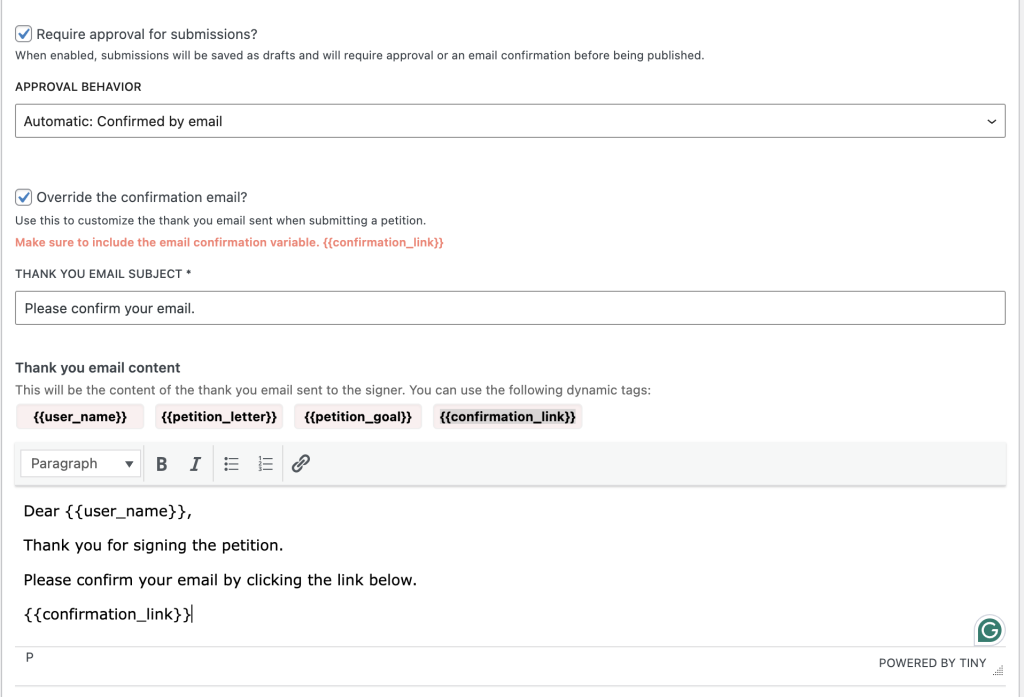
This ensures a confirmation email is sent to each signer immediately after submission. The signature will only appear once confirmed.

Customizing the Confirmation Email
You can personalize the confirmation message sent to signers:
Open petition details
Still under the Petition Details section,
Enable email override
Check the box: “Override the confirmation email?”
Write your message
A rich text editor will appear where you can write your own message.
How this works for the user
- A visitor submits a signature.
- They immediately receive a confirmation email with a secure link.
- Once they click the link, their signature is marked as approved and becomes visible/public.